Status Saver - Video Saver
- 4.6
- Rating
- 100.00M
- Installs
- Free
- Price

 Analysis by App-foxy
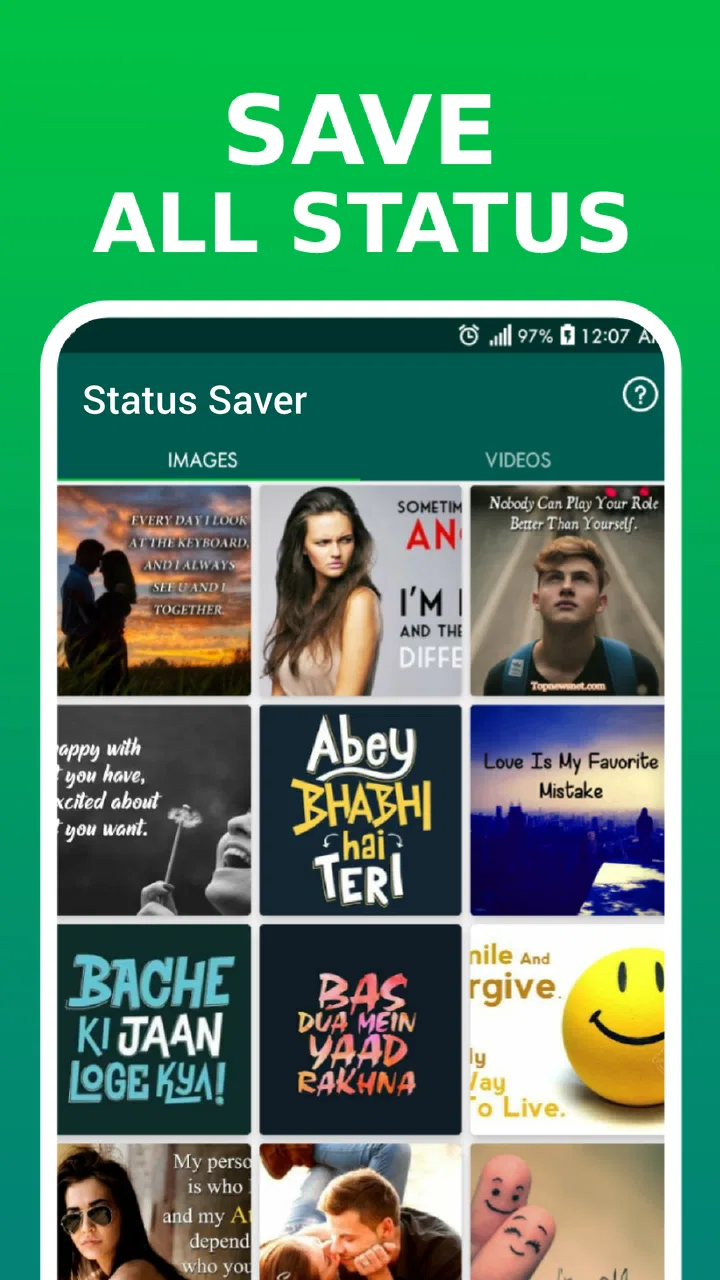
I noticed the appeal of Status Saver - Video Saver almost immediately: it focuses on a small, familiar problem that appears whenever someone shares a photo or video status worth keeping. Instead of treating social media as a place to browse endlessly, this Android app gives saved status updates a more practical role. I can look at friends’ updates, decide what is worth keeping, and return to those files later without turning the process into a complicated project.
That narrow purpose is both its strength and its limitation. During my first week, the app felt useful because it reduced the friction between seeing something interesting and preserving it. After that initial novelty, the more important question became whether I would keep opening it regularly. My answer is nuanced: it can earn a lasting place for people who frequently save status photos or short videos, but it is less convincing for anyone who only downloads media once in a while.
What using Status Saver feels like in the first week
The app belongs to the social category, although I found it more practical than conversational. Its central job is handling status media rather than replacing a messaging service or becoming another feed to scroll. The store summary points to two main ideas: saving photos and video statuses, and viewing a friend’s status without showing it as seen. Those functions shape the whole experience, so I would not install it expecting broad social networking tools.
You May Also Like

 AccuWeather: Weather Radar
AccuWeather Review: A Quick, Clear Forecast for Everyday Decisions
For everyday plans, the best forecast is the one you can understand quickly. AccuWeather makes rain timing, radar, and local conditions easy to act on, with a few trade-offs.

 Hill Climb Racing
Why Hill Climb Racing Still Turns Crashes Into One More Run
A tiny car, a bumpy hill and one more upgrade: Hill Climb Racing keeps resurfacing because its simple chaos makes every near-miss feel personal.

 AliExpress - Shopping App
AliExpress Makes Global Shopping Feel Personal, but Shoppers Bear the Risk
AliExpress turns a global marketplace into a pocket-sized discovery engine. Its reach is useful, its shopping loop compelling, and its trade-offs easy to miss.

 Lords Mobile: Kingdom Wars
Lords Mobile Is a Kingdom-Building Routine, Not a Quick Match
A case-by-case verdict on the building, battles, device demands, and social commitments that make Lords Mobile rewarding for some players and exhausting for others.

 PDF Scanner app - TapScanner
TapScanner Makes Paperwork Easier to Capture, Check, and Share
TapScanner makes scanning with a phone feel less like a rescue operation and more like a dependable step in getting work done. Its capture tools are useful, though not flawless.

 Block Blast!
 Shows How Much a Puzzle Game Can Leave Out
A quiet grid game shows why puzzle players increasingly value instant clarity, repeatable skill and low-pressure play—and where the genre still needs to catch up.
More From Our News Desk
View All News


My first useful routine was simple. I opened the app after checking a status, browsed the available media, and selected the images or videos I wanted to retain. This is especially convenient when a friend posts a temporary announcement, a useful visual reference, a funny clip, or a family moment that I want to revisit. The value comes from shortening a sequence of small actions, not from adding a large collection of features.
The private-viewing angle is more situational. Some people want to check an update quietly before deciding whether to respond. Others may simply prefer browsing without creating pressure to react immediately. I see that as a convenience rather than a reason to ignore other people’s boundaries. If a status is personal or clearly not intended for redistribution, saving it can still be inappropriate even when the app makes the action easy.
One detail I appreciated in the first week was the separation between discovery and keeping. A status can be interesting without being worth downloading, and a downloader is most useful when it lets me make that decision deliberately. I recommend avoiding the habit of saving everything. A quick review before downloading prevents the app from becoming a cluttered archive of temporary content.
The app is free to install, which makes experimenting with it easy. It carries a Teen content rating, so I would still treat it as a tool that needs sensible use rather than as a completely consequence-free utility. The developer is listed as Save Status, Video & Image Downloader, a name that makes the app’s purpose clear without suggesting that it does more than it actually does.
Small workflows that make it more useful
A realistic everyday example is a community group that shares a poster as a status rather than sending the original file directly. I might view the poster, save it, and later zoom in on the details when I need an address or schedule. In that situation, the app is more convenient than asking the person to resend the image, especially when the original conversation is busy.
Another useful workflow is temporary reference material. I may see a recipe step, a packing checklist, a product photo, or a short demonstration that I want available while I am away from the messaging app. Saving only the relevant item means I can use it later without repeatedly searching through status updates. This is a more durable benefit than simply collecting entertaining clips.
For videos, I would be selective. Short clips can be handy when I need to show someone something later, but downloading every video I see quickly turns into unnecessary storage use and a messy gallery. I found that the app works best when I treat it as a filter: save media with a clear future purpose, and leave the rest where it appeared.
The best habit is to decide why a file deserves to stay before pressing save. That one step improves the experience more than any burst of enthusiastic downloading during the first few days.
What remains valuable after the novelty fades
After the first month, the question is no longer whether the app can save a status. The question is whether that action solves a recurring problem in my routine. For me, the answer depends on how often people around me use status updates as a place for information. If status posts regularly contain event details, family photos, useful notices, or media I need to reference, the app continues to justify its place.
Its strongest long-term use is convenience through repetition. I do not need to invent a new method each time a status contains something worth keeping. The same basic workflow handles a photo and a video, and the private-viewing option can be useful when I want to browse without immediately signaling that I have watched an update. That consistency matters more than a flashy interface would.
Still, this is not an app I would recommend opening every day just to see what happens. It has no lasting value if the people I follow rarely post material I want to retain. In that case, the app becomes another icon competing for attention. A normal gallery, cloud backup, or the messaging app’s own sharing tools may be better for someone whose needs are occasional and straightforward.
Compared with manually taking screenshots, a dedicated status saver is more suitable for media that should remain in its original visual form. Screenshots are quick for text, but they may include interface elements and are awkward for video. Compared with asking the sender to share the original, this app is faster when the sender is unavailable, although direct sharing is usually the cleaner choice when image quality, context, or permission matters.
Compared with a general file manager or browser downloader, Status Saver - Video Saver is more focused. That focus reduces the amount of setup I need for this particular task. The trade-off is that it does not replace a broader media-management system. If I want organized folders, editing, backups, or cross-device file handling, I would look beyond a status-focused tool.
Who gets recurring value from it
I think it suits people who regularly receive useful media through statuses, manage a family or community group, or prefer to review updates discreetly before responding. It can also help someone who wants a quick way to preserve a visual reminder without navigating several menus. The app’s purpose is especially clear for users who repeatedly encounter the same save-and-revisit situation.
I would skip it if I almost never save status media, if I already have a reliable direct-sharing routine, or if I am looking for a full social platform. It is also not the right choice for someone who wants automatic organization across many sources. Its value comes from a specific behavior, so the decision should be based on that behavior rather than on the size of its install base.
The app has reached over one hundred million installs and holds a 4.6 average from around two hundred sixty-six thousand ratings. Those figures suggest that the use case is broadly understood, but popularity does not remove the need to judge whether it matches my own habits. A widely installed utility can still be unnecessary on an individual phone.
Where maintenance and fatigue enter the picture
The main maintenance burden is not complicated configuration; it is media housekeeping. Once saved files accumulate, the useful items can become harder to find among clips I downloaded impulsively. I recommend reviewing the saved media periodically and deleting items that no longer have a purpose. This is particularly important for videos, which can make a collection feel crowded faster than a few images.
A practical routine is to save a file for one clearly defined reason, use it, and then decide whether it deserves permanent storage. If the file is a reminder for an upcoming event, I can remove it after the event. If it is a family photo or a reference I will reuse, it can remain. This turns the app into a temporary bridge when needed rather than a permanent dumping ground.
Another source of friction is the difference between viewing privately and acting respectfully. The ability to view a status without showing it as seen may reduce social pressure, but it can also encourage passive browsing. I found the feature most reasonable when I needed time to respond thoughtfully, not when I wanted to monitor someone indefinitely. A tool can offer discretion without changing the expectations of considerate communication.
Privacy and permission also require common sense. Saving someone’s status does not automatically give permission to repost it, edit it, or send it elsewhere. I would ask before sharing personal material, especially images involving children, private gatherings, or identifiable people. This is not a technical limitation of the app; it is an important part of using a downloader responsibly.
The current version is 5.0.0, and the minimum operating system is Android 6.0. That makes the app accessible to a wide range of Android phones, including older devices that may not run newer software comfortably. On an older phone, however, I would pay closer attention to available storage and general media management, because the practical strain comes from saved files rather than from the basic idea of the app.
In-app purchases are listed at up to $19.99 per item. Since the core attraction is a focused saving workflow, I would examine any optional purchase carefully before paying. A paid addition makes sense only if it removes a recurring annoyance I actually experience. For occasional saving, the free starting point is enough to judge whether the app belongs in my routine.
What can make the experience tiring
The first fatigue point is repetition. If I open the app, see the same kinds of temporary posts, and save files without a clear purpose, the process quickly feels mechanical. The app cannot create meaningful content; it can only help handle what appears in the surrounding social environment. Its long-term usefulness therefore depends heavily on the quality and frequency of the statuses I encounter.
The second is the temptation to confuse convenience with ownership. A downloaded copy may be useful, but it can also become an unwanted duplicate. When the original status disappears naturally, the saved version remains in my storage and may be forgotten. That is why I prefer a light-touch workflow rather than treating every status as something to archive indefinitely.
The third is choosing the wrong tool for the job. If I need a polished collection of photographs, a cloud album is more appropriate. If I need the sender’s original-quality file, direct sharing is preferable. If I only need to preserve a few words, a note or screenshot may be faster. Status Saver earns its place when the source is specifically a status and the media itself is worth keeping.
There is also a social trade-off in using a private-viewing feature. Some users may appreciate the control, while others may find that it makes conversations less natural if they rely on silent observation instead of responding. I would use it as a pause button, not as a permanent communication style. That distinction keeps the feature practical without letting it become the whole reason for installing the app.
My long-term verdict
After looking past the first-week novelty, I see Status Saver - Video Saver as a focused utility rather than an essential app for everyone. It does one recognizable job and can make that job less awkward when status updates are an important part of everyday communication. The ability to save photos and videos, together with discreet status viewing, gives it a clear identity within social tools.
Its lasting value depends on a simple test: do I regularly encounter status media that I need to revisit? If yes, the app can become a quiet, dependable part of my routine. If no, it will probably spend most of its life unused. I would not install it because it is popular alone; I would install it because its specific workflow matches a recurring need.
I also recommend keeping expectations realistic. This is not a replacement for a gallery, backup service, file organizer, or direct messaging. It is a convenient middle step between seeing a status and deciding what to do with it. That narrow role is exactly why it can feel efficient, but it is also why broader alternatives may serve some users better.
For me, the deciding factor is maintenance. If I save selectively, clear out expired reminders, and respect the original poster’s privacy, the app remains useful beyond the initial curiosity. If I download indiscriminately, the benefit fades into clutter. Status Saver - Video Saver earns lasting space when it supports a real habit, not when it becomes another place to collect things I will never open again.
Overall, I would recommend trying it to Android users who frequently save status photos or videos and want a quieter way to browse updates. I would advise occasional users to compare it with their existing gallery and sharing tools first. The free entry point makes that decision easy, while the Teen rating, optional purchases, and focused design are good reminders to use it deliberately. In the right routine, it is genuinely handy; outside that routine, it is easy to outgrow.
FAQs for Status Saver - Video Saver
01What is Status Saver - Video Saver and what does it do?
Status Saver - Video Saver is an app designed to help users download and save videos and images from social media statuses. By allowing users to keep memorable moments shared by friends and family, it serves as a handy tool for those who wish to revisit and store shared content beyond the typical 24-hour status expiration.
02Is Status Saver - Video Saver safe and secure to use?
Yes, Status Saver - Video Saver is generally safe to use, as it does not require any personal data or intrusive permissions. However, it's important to download the app from a trusted source like Google Play Store or Apple App Store to avoid potential security risks from unofficial versions.
03Does the app support all types of media formats for download?
Status Saver - Video Saver supports a wide range of media formats, including popular video and image formats such as MP4, JPEG, and PNG. This ensures compatibility with most media files shared across social media platforms, allowing users to save their favorite content without any hassle.
04Can I use Status Saver - Video Saver for free, or are there any purchase options?
The app offers a free version with basic functionalities, allowing users to download and save content. However, there may be in-app purchases or a premium version available, which provides additional features or removes ads for an enhanced user experience.
05Are there any legal considerations when using Status Saver - Video Saver?
While using Status Saver - Video Saver, users should be mindful of copyright and privacy laws. It's recommended to download content only with the permission of the original creator, especially if the content is intended for public use, to avoid potential legal issues.
Pros
- Easy to navigate and user-friendly interface.
- Supports multiple media types and formats.
- No registration required to use the app.
- Fast download speeds for all media.
- Secure and respects user privacy settings.
Cons
- Contains ads that can be intrusive.
- Limited editing features for saved media.
- Requires frequent updates for bug fixes.
- Not compatible with all device models.
- Occasional crashes on older OS versions.

Status Saver - Video Saver
Gallery